


Weather Radar Home
4.2706.00 Reviews
App Specs
- Version
- 4.0.46
- Updated On
- License
- Free
- Downloads
- 500,000+
- Developer
- OmniHome Apps
- Categories
- Weather
- Platform
- Android
Screenshots
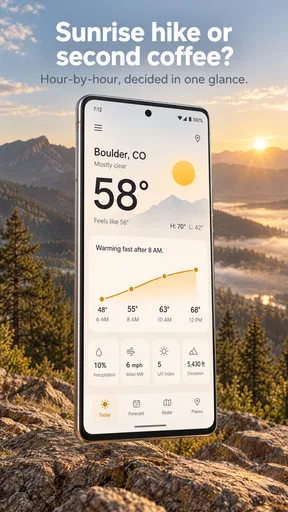
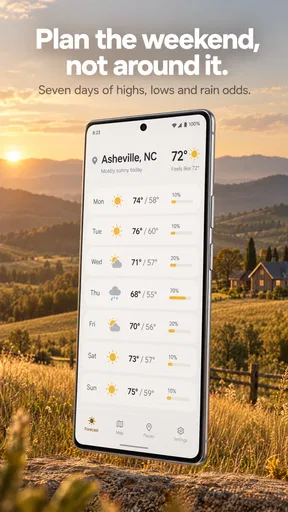
 Analysis by AppCompare
I judge a weather app by whether it helps me make a better decision before I leave home, not by how many numbers it can squeeze onto a screen. Weather Radar Home makes its strongest case with radar at the center of the experience: it gives me a visual way to check what may be moving toward my area, alongside forecasts and severe-weather alerts. That combination is useful when a simple temperature check is not enough, though I would treat any forecast as guidance rather than a guarantee.
Why the radar view is the main draw
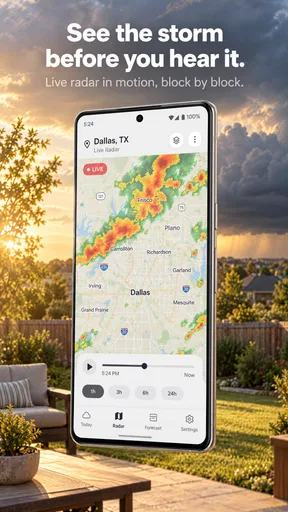
The most practical reason I’d open Weather Radar Home is to answer a specific question: does the weather look unsettled near me, and is it worth adjusting my plans? A radar map is more helpful than a single icon when conditions are changing, because I can zoom in, move around the map, and look at the broader picture instead of relying only on a brief summary. It suits a quick check before walking the dog, heading to a bus stop, or deciding whether to bring a rain jacket.
That visual approach has a trade-off. Radar can show a pattern, but reading it well still takes judgment; a colored area on a map is not a promise that rain will fall on my exact street at a particular minute. I find the best workflow is to use the radar to spot a possible change, then check the forecast and alerts before making a decision that matters. It’s a useful distinction for anyone expecting a map to function like a precise local guarantee.
A useful routine for busy days
On a weekday, I would keep the widget as the quick glance and open the app when the sky or the forecast looks uncertain. That saves time for ordinary mornings while leaving the map available for a closer look. The multiple-location option also has a practical purpose beyond travel: I can check conditions where a relative lives before calling, or compare home with a place I plan to visit. It is an easy way to avoid treating my current weather as representative of every location I care about.
For a realistic example, imagine I’m planning an afternoon walk and the morning forecast looks fine, but clouds are gathering later. I’d check the radar before leaving, look at the conditions around both the starting point and the route, and then use any relevant alert as a reason to reconsider. If the picture remains uncertain, I’d choose a shorter loop or take a light layer. The value here is not that the app makes the decision for me; it puts a few useful clues together so I can make a more informed one.
What it does well—and where I’d be cautious
The app’s balance of map, forecast, and alerts is its clearest strength. A basic weather screen is often enough for deciding what to wear, but it can feel thin when I want to understand changing conditions. Here, I can move from a broad visual check to the forecast without switching immediately to a separate radar tool. The home-screen widget adds convenience for repeat checks, particularly if I like to see conditions without opening another screen.
Still, I would not use a consumer weather app as my only source for a high-stakes decision. Severe weather can develop quickly, and an alert on a phone is not a substitute for paying attention to local guidance or taking sensible precautions. I’d also expect the usefulness of a radar view to depend on having a reliable connection and on how familiar I am with interpreting what it shows. If I only want a plain temperature and a simple daily outlook, a phone’s built-in weather screen may be faster and less busy.
Worth Reading Before You Choose

EA SPORTS FC Mobile 26 Is a Bigger Football Game, but It Takes Time

Flipboard Shows What News Apps Must Do Beyond the Feed

Switching to Android Auto Means Rethinking Your Driving Routine

Google Calendar Makes a Crowded Week Easier to Manage

Ludo King Makes the Most of the Minutes Between Plans

Baby Panda World Brings Quick Play to Modern Phones, but Its Game Library Feels Busy
Who should try it
I think it is a good fit for people who check the weather several times a day, care about rain moving through their area, or want a radar view available without making it their entire routine. Walkers, commuters, and anyone who plans outdoor errands around changing conditions can get more from it than someone who checks the forecast once in the morning and forgets about it. The widget and the option to follow multiple places make it more practical for those everyday habits.
I’d be less inclined to recommend it to someone who wants only a minimal forecast, or who prefers not to interpret map layers and alerts. If your main need is a long-range outlook for planning far ahead, compare the forecast details with another trusted source rather than assuming the radar settles that question. The app is most convincing as a convenient weather companion, not as a replacement for local warnings or careful planning.
Features That Shine
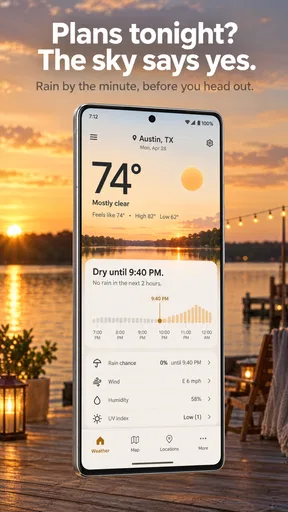
First things first, Weather Radar Home is packed with features that make checking the weather as easy as pie. Once you fire up the app, you’re greeted with a sleek and intuitive interface. It doesn’t just bombard you with numbers; it presents the weather in a visually appealing way. You've got your radar maps, detailed forecasts, and even severe weather alerts. It's all there, neatly wrapped up.
The radar maps are probably my favorite. You can zoom in and out, swipe around, and get a real-time view of what's happening in the skies above. It’s like having a bird’s eye view of your entire region. And if you’re a weather nerd like me, you’ll appreciate the level of detail it provides.
Usability and Performance
Now, let’s talk usability. The app is smooth and responsive. Whether you’re on Android or iOS, you’ll find it runs without a hitch. I’ve tested it on both platforms, and it holds up well. Navigation is a breeze, with easy access to various features and settings.
One cool thing is the customizable home screen widgets. You can set them up to display the weather for your location, so you’re always in the loop without even opening the app. Talk about convenience!
How Accurate Is It?
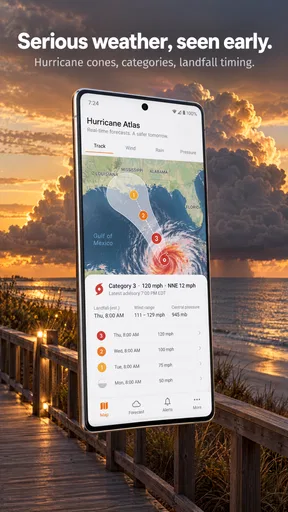
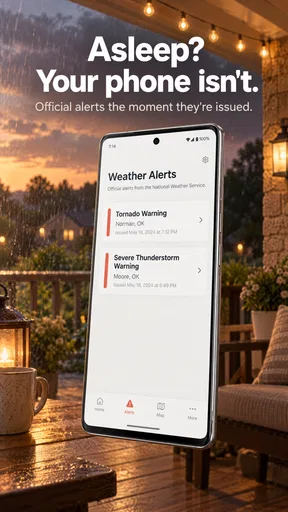
Accuracy is where this app truly shines. I’ve been comparing its forecasts with other sources, and it consistently hits the mark. The real-time updates ensure you’re getting the latest info. Plus, the severe weather alerts are a lifesaver. If there’s a storm brewing, you’ll know well in advance. It’s peace of mind in app form.
Design and Aesthetics
Now, I’m a sucker for a good-looking app, and Weather Radar Home doesn’t disappoint. The design is modern and clean, with just enough flair to keep it interesting. The color schemes are easy on the eyes, and the layout is user-friendly. You won’t find yourself squinting or hunting for info—it’s all laid out in a way that makes sense.
Additional Perks
Aside from the core functionalities, the app offers some extra goodies. You can view weather conditions in multiple locations, which is handy if you’re a traveler or have family across the globe. There’s also a nice selection of weather-related news and articles if you want to dive deeper into meteorology.
Oh, and did I mention it’s free? Sure, there are some in-app purchases if you want to unlock premium features, but the free version is more than adequate for everyday use.
In the end, Weather Radar Home is a solid choice for anyone looking to stay on top of the weather. It’s accurate, easy to use, and looks good doing it. Whether you’re planning a trip or just need to know if you should grab an umbrella, this app has got you covered. Give it a whirl; you won’t be disappointed!
How it fits alongside other weather apps
Weather apps tend to fall into two everyday camps: quick summary screens and map-first tools. I see this one leaning toward the second without making the forecast disappear. Compared with a basic built-in app, its appeal is the ability to inspect a radar map and keep more than one location in view. Compared with a specialist radar service, the broader mix of forecasts, alerts, widget access, and weather reading makes it feel more like an all-purpose home-screen companion than a single-purpose map.
That middle ground will not suit everyone. If I need nothing beyond today’s high and low, opening a standard weather panel is probably the quicker habit. If I’m following a serious storm closely, I would favor official local updates alongside the app rather than relying on one map. For ordinary planning—especially deciding whether to shift an errand by an hour—the mix here is more convenient than jumping between separate forecast and radar apps.
Small habits that make the information more useful
I’d set the widget to the place I check most often, then use the app’s location options for destinations I visit regularly. That keeps the home screen focused instead of turning it into a wall of weather. Before an outdoor plan, I’d compare the current radar picture with the forecast rather than checking only once early in the day; a snapshot can become less useful as conditions change. When an alert appears, I’d read it as a prompt to pay attention and verify what action is appropriate, not as a reason to assume every nearby place faces identical conditions.
The articles are a different kind of extra. They may be worthwhile when I want context or a more engaging way to learn about weather, but I wouldn’t treat them as a substitute for the forecast itself. Keeping those roles separate helps: use the map and forecast to plan, alerts to notice potential hazards, and the reading material when there’s time to explore the subject.
Practical details before you install
Weather Radar Home is a free weather app from OmniHome Apps, rated for Everyone, and its current version is 4.0.31. It has an average rating of 4.0 from around a thousand ratings, with nearly three hundred written reviews, and has passed half a million installs. It first appeared on August 17, 2024, and supports devices running version 8.1 or later. Those details make it straightforward to assess whether it fits your device and comfort level, but they don’t change the main question: will you actually use the radar and widget often enough to prefer this to a simpler forecast screen?
For someone deciding whether the free option is enough, I’d start with the everyday routine: check the forecast, try the radar when weather looks changeable, and see whether the widget earns a permanent place on the home screen. The app is usable for ordinary checks without making payment the first step. If you later consider an in-app purchase, weigh it against the particular feature you want rather than assuming you need an upgrade just because one is offered.
My recommendation
My overall view is that this is most worthwhile for people who want to see weather patterns, not merely read a single forecast line. Its combination of radar, alerts, multiple locations, and a widget gives it a clear everyday purpose, while the clean presentation keeps those tools approachable. I would recommend it to a commuter, an outdoor planner, or anyone who likes to check whether conditions are changing before committing to a plan.
I’d skip it if a minimal forecast already answers your questions, or if you need a dedicated professional tool for decisions where precision and official instructions matter. For everyone in between, the sensible approach is to use the map as context, keep an eye on alerts, and let the forecast inform rather than dictate plans. That is where Weather Radar Home feels most useful: a convenient way to look beyond the weather icon and make a better-informed everyday choice.
Pros
- Detailed weather forecasts available.
- Real-time radar updates for accuracy.
- User-friendly interface with easy navigation.
- Customizable alerts for severe weather.
- Covers multiple locations simultaneously.
Cons
- Ads can be intrusive at times.
- Premium features require a subscription.
- Occasional lag in radar loading.
- Limited offline functionality.
- Some data may not be hyper-local.
FAQs for Weather Radar Home
How accurate is Weather Radar Home's forecasting feature?
Weather Radar Home uses advanced algorithms and real-time data from meteorological services to provide highly accurate forecasts. Users can expect precise information about temperature, precipitation, and wind conditions. However, like all weather apps, absolute accuracy can vary due to sudden changes in weather patterns.
Can I customize the alerts in Weather Radar Home?
Yes, Weather Radar Home offers customizable alerts. Users can set notifications for severe weather conditions such as storms, heavy rainfall, or extreme temperatures. This function ensures you are always prepared, allowing you to adjust frequency and type of alerts based on your preferences.
Does Weather Radar Home offer global coverage?
Weather Radar Home provides global weather coverage, making it suitable for international travelers or those with interests abroad. The app includes detailed maps and forecasts for regions worldwide, ensuring users can access weather information wherever they are or plan to go.
Is there a subscription fee for Weather Radar Home?
Weather Radar Home offers a free version with basic features. However, for an ad-free experience and access to premium features like advanced radar and customization options, users may opt for a subscription plan. Pricing details can be found in the app store listing.
What are the key features of Weather Radar Home?
Weather Radar Home includes interactive radar maps, hourly and weekly forecasts, severe weather alerts, and customizable notifications. Additionally, it offers detailed weather data such as humidity, wind speed, and UV index. These features make it a comprehensive tool for staying updated on weather conditions.


